USMILE D50 ELECTRIC TOOTHBRUSH
An Electric Toothbrush with a Christmas Message from You.
Add your photo, Christmas message, and name to their usmile D50.

Your photo

Their D50
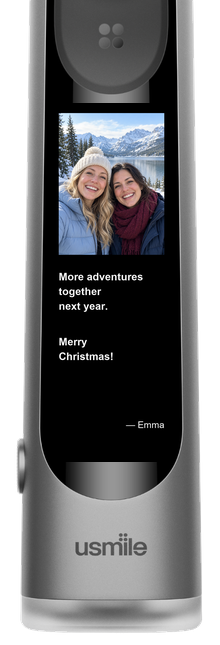
Illustrative screen preview.
A personal touch for Christmas
A Memory You Share.
A Message from You.
A favorite trip. A moment worth remembering. Choose a photo that brings back a memory you share.
“More adventures together next year.
Merry Christmas! — Emma”
From you to them
Create it. Share it. Make their day.
For the gift giver · On our website
Create and share.
Create your gift.
On the usmile website, upload a photo, write your Christmas message, and add your name.
Creation link · Opens November 10. Stay tuned!
Share the link.
Share the generated link with your recipient. They can follow the steps below to reveal the message once they have their D50.
Create your gift
A photo. A few words. All from you.
Get your share link
A personal note, ready to send.
For the recipient · usmile app + D50
Reveal your message.
Open the link.
Open the shared link to find your gift QR code.
Connect your D50.
Download the usmile app, then add and connect your D50 in the app.
Scan to claim your gift.
In the app, tap + at the top right, then Scan. Scan the QR code on the page opened from the shared link to claim the gift. Then download it to your D50 to reveal it on the screen.
Who are you thinking of?
Make the story your own.
For your partner
That photo from your first trip together.
“Still my favorite travel buddy.”
For Mom or Dad
A family photo with everyone squeezed into the frame.
“For all the ways you take care of us. Love you.”
For a close friend
The picture that always brings back the same joke.
“Here’s to another year of laughing at the same things.”
Your questions, answered
A few things to know.
Do I need to buy a D50 to create a personalized gift?
No purchase is needed to create one. Starting November 10, anyone can try it on our website. The recipient needs a D50 toothbrush to reveal it on the screen.
Do I need to update the app and toothbrush?
Yes. Update both the usmile app and your D50 toothbrush firmware to the latest versions before using this feature.
Does the recipient need the usmile app?
Yes. They'll need the usmile app and a paired, connected D50 to scan the QR code and download the gift.
Can someone else claim the same gift?
No. Once claimed, it is linked to the recipient's usmile account. Other accounts can't claim or reveal it.
How do I close the message or view it again?
Press any button on the toothbrush to close it. To view it again, scan the QR code again using the same usmile account. You can do this as often as you like before it expires.